 BeadSheet
中文
BeadSheet
中文
Artkal Bead Pattern Maker for S-Series Beads
Artkal's S series has one of the widest color ranges of any 5 mm fuse bead, and that is exactly what a photo pattern needs. Upload a picture and BeadSheet matches every cell to 199 Artkal S colors, from S01 White to glitter and pearlescent shades. You get a pegboard-by-pegboard PDF and an exact bead count, all without uploading anything.
1 Choose a picture
Or try a sample:
2 Beads & size
3 Colors
Image adjustments
4 Preview
Choose a picture or a sample to see your pattern here.
Bead list (tap a color to highlight it)
| Sym | Color | Code | Beads |
|---|
Why Artkal works so well for photo patterns
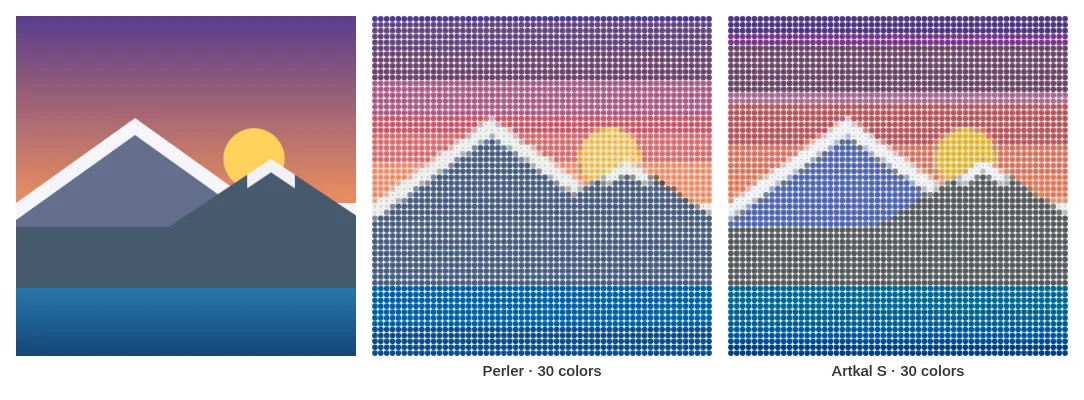
When a converter only has a few dozen colors, a sunset turns into stripes and skin tones turn orange. More colors give the matcher more chances to land on the right shade. With Artkal S, BeadSheet can choose from 199 colors, roughly double our Perler or Hama palettes. Gradients, shadows and soft backgrounds hold together, often without dithering.
The trade-off is shopping. A 58 × 58 portrait with no color limit can easily ask for 40+ different bags. That's why the "Max colors" slider matters most on this page: start around 20–30 for a four-board portrait, look at the preview, and raise it only where you see banding. BeadSheet drops the least-used colors first and re-matches those beads to the nearest remaining shade, so cutting colors costs as little detail as possible.
How to make an Artkal pattern
- Upload or paste a photo. Well-lit, in-focus pictures with clear contrast convert best.
- Keep "Artkal S (5 mm)" selected and choose your layout: 1 × 1 up to 4 × 4 boards, or a custom size up to 200 × 200 beads.
- Set a color cap and compare dithering on and off. With Artkal's dense palette the non-dithered version is often smooth already, and it's easier to build.
- Nudge the image. A little extra saturation helps, because fused beads tend to look duller than a backlit screen. Contrast helps faces.
- Export. PDF for building, PNG for sharing, CSV for your shopping list.
The Artkal family: S, R, C, A and more
Artkal (made by Ukenn Culture Development) sells several bead lines, and the letter tells you which one:
| Series | Size | Type | Notes |
|---|---|---|---|
| S | 5 mm (Midi) | Hard | The popular all-rounder. This is the palette BeadSheet uses. |
| R | 5 mm (Midi) | Soft | Flexible after fusing; Artkal suggests using soft beads on their own |
| C | 2.6 mm (Mini) | Hard | For fine detail; Artkal says they're compatible with Perler and Hama minis |
| A | 2.6 mm (Mini) | Soft | Flexible; aimed at jewelry and accessories |
| M / X | 3 mm / 10 mm | Hard | Smaller ranges for special uses |
Artkal says the hard S and C beads stay rigid and durable after ironing, while the soft R and A beads bend and spring back. That's nice for bracelets, less so for a flat wall piece. If you're building from a BeadSheet pattern, buy S-series beads so the codes in your bead list match the bags.
Color counts differ between Artkal's own pages (the S range is listed at 200+ colors). Our 199-color S palette comes from the community beadcolors dataset, so a handful of new or discontinued shades may be missing or extra.
Reading Artkal S color codes
Standard colors run S01 (White), S02, S03 and up, with S13 as Black. Artkal also groups special finishes under their own prefixes, and BeadSheet keeps them:
- SE: an extra series of muted tones (Moon, Rose Quartz, Desert, Toffee…)
- SG: glow in the dark
- SL: glitter
- SN: neon
- SP: pearlescent
- ST: transparent
Turn on "Exclude translucent, glow & metallic beads" and the transparent, glow, glitter, pearlescent and metallic shades drop out of the match, so a portrait stays opaque. Neon beads stay in. Want a pattern from what's already in your Artkal box? Tick your colors in My colors and switch on "Only use colors I own". Ownership overrides the specialty filter, so any owned glitter bead can still be used.
Artkal pegboards and pattern sizes
Artkal's large square 5 mm pegboard is about 14.5 cm across and links to others. A standard 29 × 29 grid at 5 mm gives the same size, so BeadSheet uses 29 pegs as the default. If your board has a different peg count, type it in and the PDF re-splits the design.
| Goal | Suggested size | Colors to start with |
|---|---|---|
| Keychain, icon, coaster | 29 × 29 (1 board) | 10–15 |
| Pet or face portrait | 58 × 58 (4 boards) | 20–30 |
| Photo-realistic wall art | 87 × 87 (9 boards) or larger | 30–45 |
→ Presets: Artkal 29x29 pattern maker · Artkal 58x58 pattern maker
How to iron Artkal beads
Artkal's method differs from Hama's "keep the iron moving" approach:
- Cover the whole design with ironing paper (matte finish) or Artkal ironing film (glossy finish; Artkal warns to keep the film below 180 °C).
- Set a dry iron to medium, about 160–180 °C (320–356 °F).
- Hold the iron on the paper for about 2–3 seconds at a time, working across the piece until the beads have joined.
- Peel off the paper, flip the design and iron the back the same way.
- Cool it flat under a heavy book.
For big multi-board pieces, Artkal also recommends taping the design with masking tape, flipping it off the pegboard and ironing it away from the board. That protects the board and keeps large pieces together.
Mixing Artkal with Perler or Hama
Artkal says its S beads are compatible with Perler and Hama, and many crafters mix them. Sizes and grids match. Colors and finishes don't. Two "blacks" from different brands rarely look identical next to each other. If you mix, keep each brand to whole areas (outline in one, fill in another) and iron a test patch first. Or switch "Bead brand" and regenerate for Perler or Hama.
Frequently asked questions
Which Artkal series does this maker support?
S series (5 mm hard beads), 199 colors. R, C, A, M and X palettes aren't included yet.
Can I use the pattern with Artkal C mini beads?
The grid works, and the finished piece will be about half the size (2.6 mm beads). But C colors have their own codes, so you'll need to match colors yourself.
How many Artkal colors should I use?
Start with 10–15 for one board, 20–30 for four boards and 30–45 for nine. Raise the cap only if you see visible banding.
Do I need dithering with Artkal?
Often not. The wide palette already blends shades. Try both. Dithering helps skies and skin but adds scattered single beads that take longer to place.
Are the on-screen Artkal colors exact?
They're community-measured approximations. Artkal doesn't publish official RGB values, and beads vary by batch and lighting.
Is it free, and are photos uploaded?
Free, with no sign-up. Photos are processed in your browser and never uploaded.